 Apple Music Downloader
Apple Music Downloader MP3
AppleMusicRipper is a free online Apple Music Downloader that allows users to download any song, album, and playlist from Apple Music, and save Apple Music also local MP3 files in 320Kbps. This online tool offers a simple way to download Apple Music to MP3 for offline listening on any devices.
Download Apple Music songs, albums and playlists to MP3 in 320Kbps for free. Keep your Apple Music collections forever and make them playback offline on any devices.
How to Free Download Apple Music to MP3
Step. 1 : Open the Apple Music App, or the Apple Music website music.apple.com in your browser.
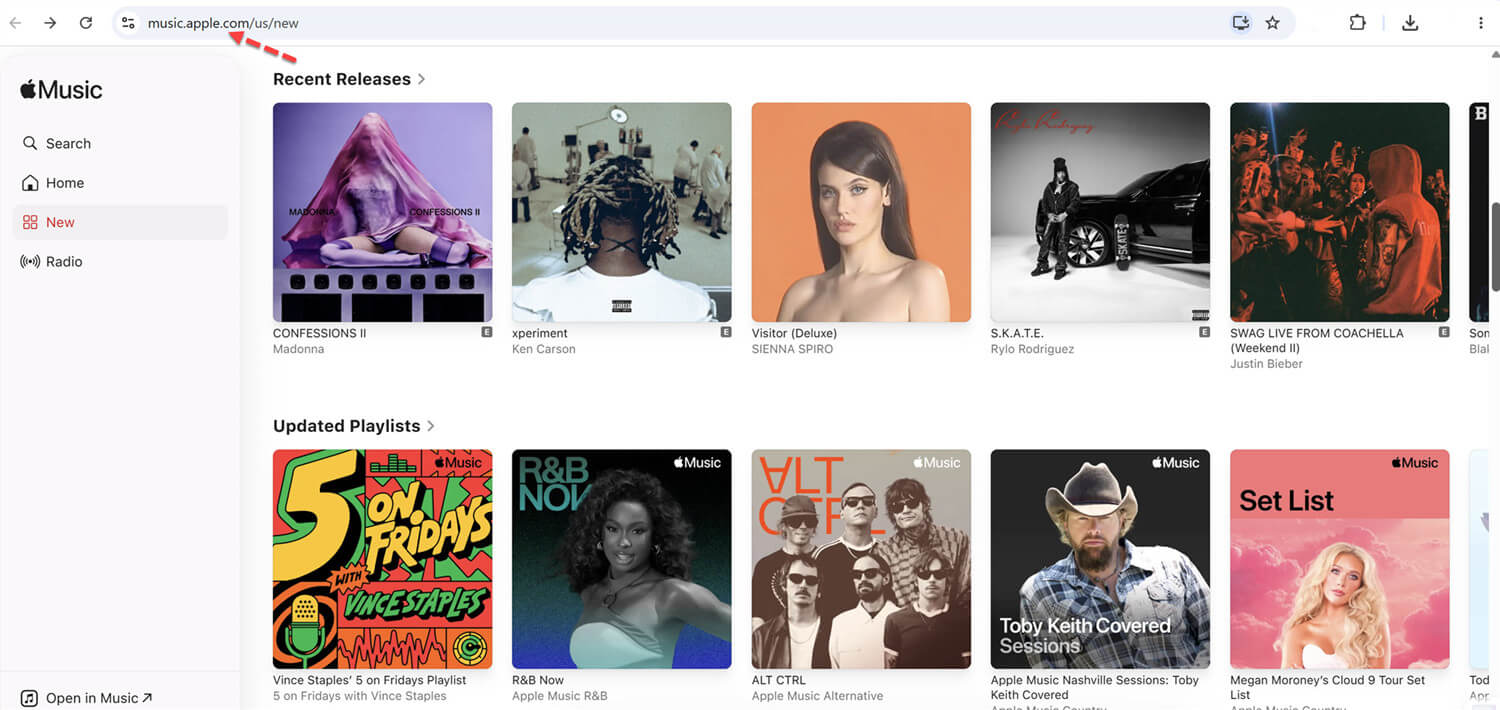
Step. 2 : Open the Album or Playlist and select the song you want to download in MP3.
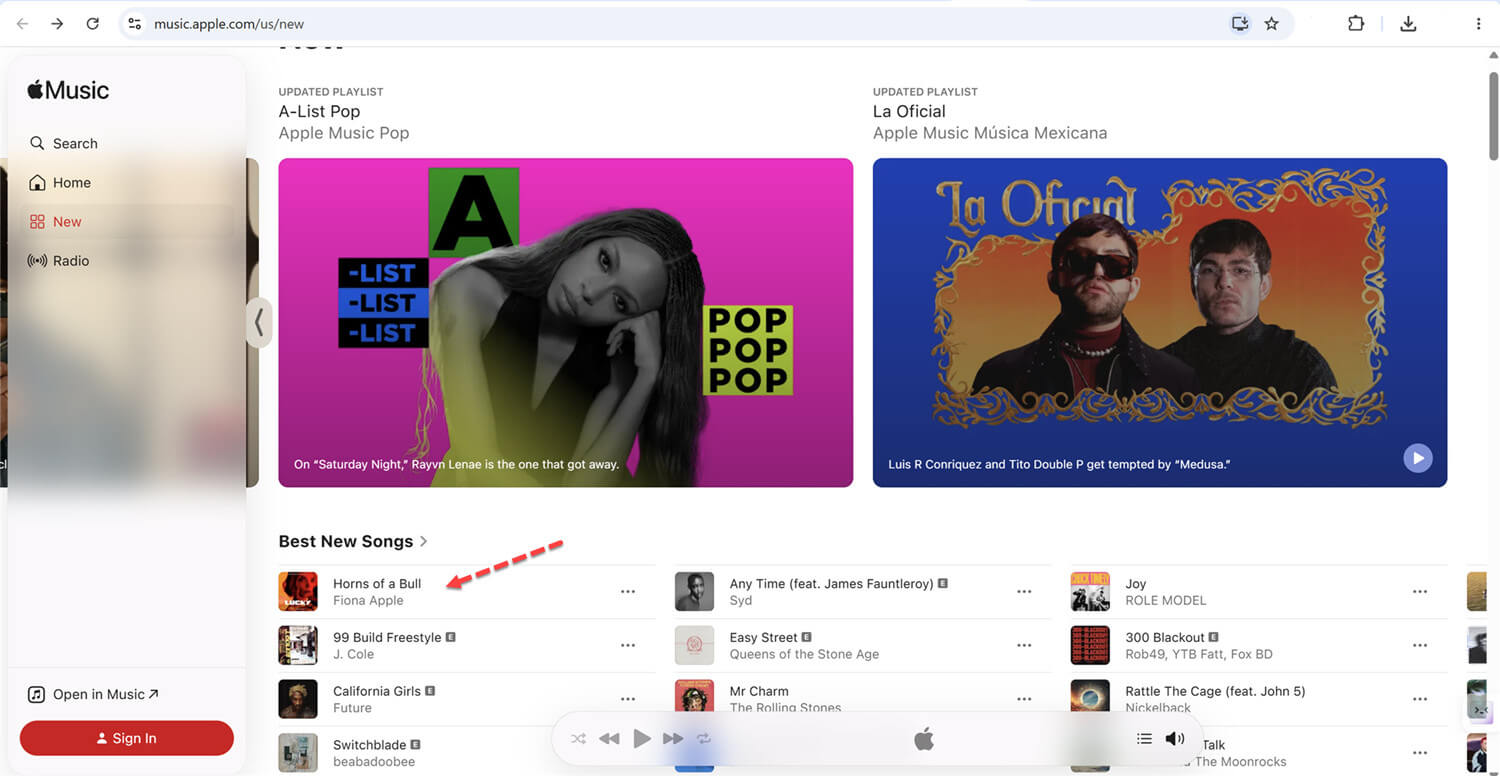
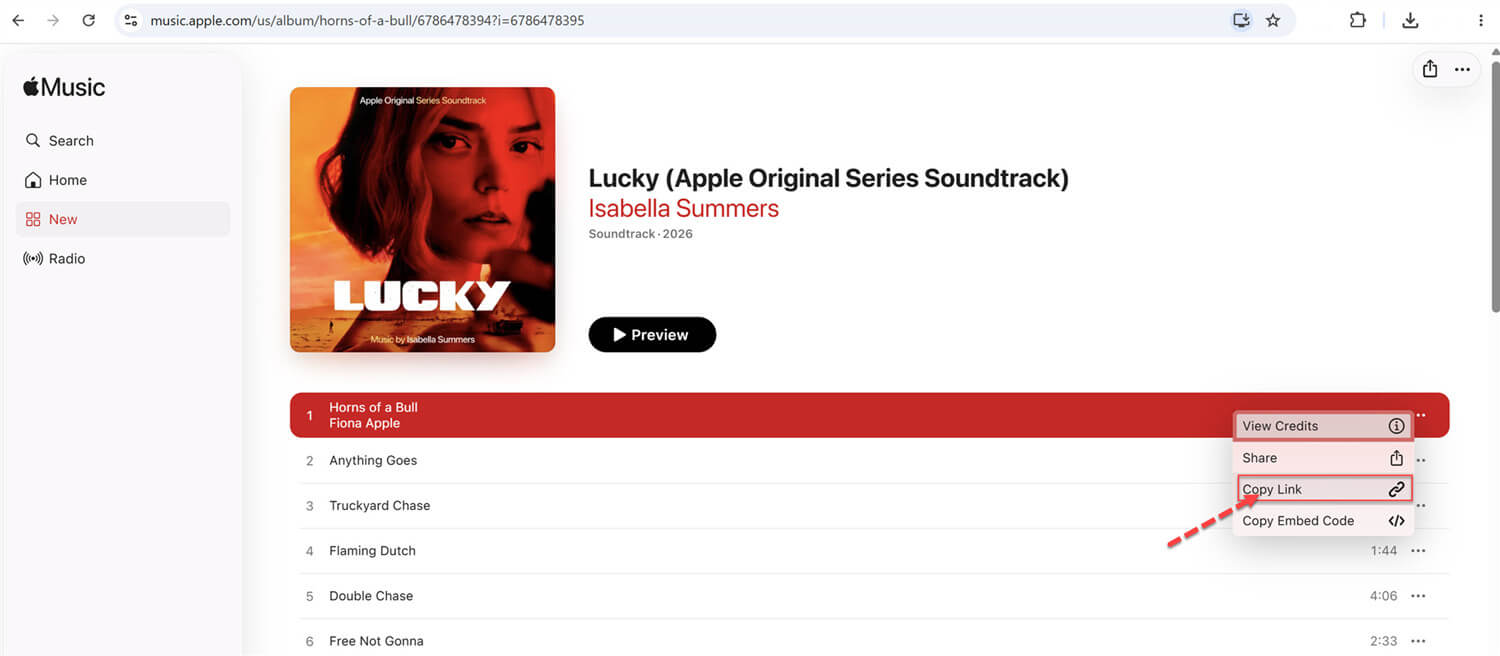
Step. 3 : Find a track you want to download, Click the and click button.
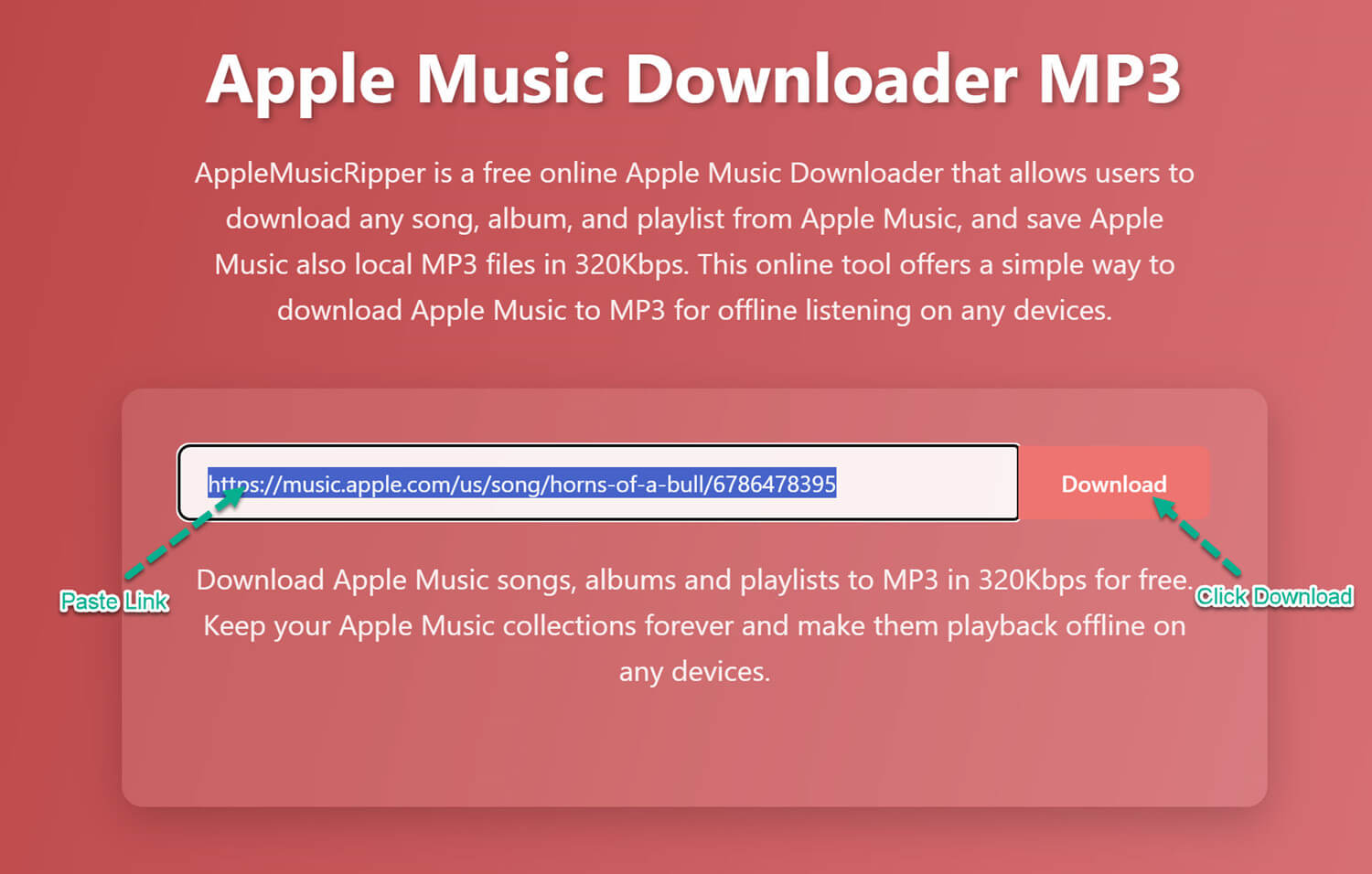
Step. 4 : Visit Apple-Music-Ripper.com Apple Music Downloader MP3, and then paste the link in the search box above, click "Download" button, and wait for the online download tool to process the link, then select MP3 quality and start save Apple Music as local MP3 files.
Step. 5 : After saving the MP3 music to your device, you can enjoy your music offline! 🎉
Tips : To batch download SongsPlaylist/Album from Apple Music for offline listening, view below simple guide
- Batch Download Apple Music Playlist/Albums to MP3

1. Copy the Apple Music Song/Playlist Link
Open the Apple Music app or website and locate the song, album, or playlist you want to download. Tap the Share option and select Copy Link to get the music URL.
2. Paste the Apple Music Link
Visit the website Apple-Music-Ripper.com Apple Music Downloader to MP3, then paste the copied URL onto the input field at the top of the page, clicking “Download” button to run the link analyze process.
3. Download MP3 Music from Apple Music
The tool will show you the download MP3 music file, click “Download MP3” option to start downloading MP3 music from Apple Music.
Apple Music Downloader Online
Apple Music is a widely used music streaming platform that provides millions of songs, albums, and curated playlists for listeners worldwide. However, some users prefer a more flexible way to enjoy their music offline without relying on continuous subscriptions or app limitations. If you are looking for a simple way to save Apple Music songs without extra cost, AppleMusicRipper offers an easy online solution. On this page, you can use AppleMusicRipper to convert Apple Music tracks and playlists into MP3 files directly from your browser for free. The tool is designed for users who want quick access to their favorite music and the ability to listen offline anytime.
Whether you want to build a personal music collection or keep your favorite songs accessible across different devices, AppleMusicRipper makes the process straightforward. By the end of this guide, you will also learn how to batch download Apple Music songs, albums, and playlists to MP3 using a more advanced desktop solution for better efficiency and control.
User Friendly Interface
If you want an easy way to convert Apple Music songs, albums, and playlists, AppleMusicRipper offers a clean and simple interface that makes the whole process quick and beginner friendly.
Multiple Output Options
Unlike many online tools that only provide MP3 downloads, AppleMusicRipper supports several output formats such as MP3, M4A, AAC, FLAC, WAV, and AIFF, giving you more flexibility for playback and file management.
High Quality Audio Output
AppleMusicRipper maintains excellent sound quality during conversion, allowing you to enjoy clear and enjoyable music playback after downloading.
Fast Processing Speed
With optimized conversion technology, AppleMusicRipper can process your selected songs quickly, helping you save time when downloading multiple tracks.
Better Listening Experience
The tool helps you save music for offline playback, so you can enjoy your favorite Apple Music tracks without interruptions or streaming limitations.
Keep Original Music Information
AppleMusicRipper preserves important ID3 tag details such as song title, artist name, album artwork, and other metadata, making it easier to organize your music library.
Secure and Reliable Service
Your privacy is protected during the download process. AppleMusicRipper does not store personal data and provides a safe and stable conversion experience.
Clean Download Environment
Designed for simplicity and convenience, AppleMusicRipper works without unnecessary pop ups, allowing you to convert Apple Music to MP3 smoothly in just a few steps.
Our Reviews
Why Choose Us
AppleMusicRipper is a free and easy to use online tool designed to help music fans download songs, albums, and playlists from Apple Music. Once you copy the link of an Apple Music track, album, or playlist, converting Apple Music to MP3 becomes simple and fast. The tool also keeps important music details after downloading, including song title, artist name, album information, and cover artwork, making your music library well organized.
With its clean and intuitive interface, AppleMusicRipper makes downloading Apple Music tracks straightforward. Simply copy and paste the music link to start the download process instantly. While saving Apple Music songs may seem difficult, AppleMusicRipper provides a practical solution for personal offline listening. Please note that downloaded music should be used for personal enjoyment only and not for commercial purposes.
User Reviews
Daniel Brooks
January 18, 2026
AppleMusicRipper is a very helpful online tool for saving Apple Music songs as MP3 files. I like that I can download tracks directly from my browser without installing anything. The desktop version is even better because it lets me convert playlists into multiple formats with higher quality.
Sophia Turner
December 2, 2025
This online Apple Music downloader works smoothly and makes it easy to save songs for offline listening. I only need to paste the link and start downloading. After trying the desktop software, I found batch downloading much faster and more convenient for large playlists..
Kevin Morales
August 27, 2025
AppleMusicRipper helped me quickly download several Apple Music tracks to my computer. The process is simple and beginner friendly. I also tested the Mac desktop tool, which allowed me to download full albums while keeping good audio quality.
Emma Richardson
March 10, 2025
I enjoy using AppleMusicRipper because it is easy and reliable. The online version works well for single songs, while the desktop program is great for downloading playlists in bulk. Everything feels safe and straightforward from start to finish..
James Walker
February 14, 2026
AppleMusicRipper is very easy to use and saves me a lot of time. I can quickly download Apple Music songs directly from my browser without any setup. The desktop version is even more powerful, especially for converting full playlists in high quality.
Olivia Bennett
November 9, 2025
I really like how simple this tool is. Just paste the link and the download starts right away. The online version is perfect for single tracks, and the desktop software makes it easy to download entire albums at once.
Frequently Asked Questions
Yes. AppleMusicRipper is a free online tool that helps users convert Apple Music songs into MP3 files for offline listening quickly and easily.
AppleMusicRipper provides a simple and efficient way to download Apple Music tracks online without installing extra software, making it a convenient choice for many users.
If you want an easy and flexible way to save songs, you can use an online Apple Music downloader like apple-music-ripper.com/ to download your favorite tracks. For faster downloads and better efficiency, you can also use the UkeySoft Apple Music Converter desktop software. It works on both Windows and Mac and lets you batch download songs, playlists, and albums to MP3 on your computer without using the Apple Music app.
Yes. AppleMusicRipper allows you to download Apple Music songs through your browser and save them to your computer or mobile device for offline playback.
Simply copy the Apple Music track or playlist link, paste it into AppleMusicRipper, choose MP3 as the output format, and start the conversion. The tool completes the process within minutes.
Yes. AppleMusicRipper uses secure processing methods to protect user privacy. The service is regularly maintained to ensure a safe and stable downloading experience.
There is no strict limit when using AppleMusicRipper. However, for downloading large playlists or multiple albums more efficiently, the desktop version is recommended.
Yes. After downloading, the songs are saved as local audio files on your device, allowing you to keep and play them anytime without streaming restrictions.
You can download songs by using AppleMusicRipper online or by using the desktop converter. Both options allow you to save music directly to a Windows or Mac computer.
Yes. In addition to MP3, the desktop version - UkeySoft Apple Music Converter is compatible with Windows and Mac, it supports to download Apple Music to M4A, WAV, AAC, FLAC, and AIFF, giving you more flexibility for different devices.